
Jane Developer Platform API Quick Start Guide
The Jane Developer Platform (JDP) APIs let Technology Partners build secure, practitioner-authorized integrations—called Jane Extensions—that access clinic data on their behalf. This guide shows you how to authenticate a practitioner and make secure API calls on their behalf.
By the end of this document, you will:
- Understand how to allow an authenticated practitioner to authorize your extension.
- Make secure JDP API calls on behalf of Jane practitioners.
Before you begin, here's how Jane handles API versioning:Jane uses a date-based versioning strategy, where the API version is embedded in the URL path (e.g.,
/YYYY-MM-DD/). The date represents a major version. Minor and patch changes occur within the same version and do not change the path. If a version includes the-betasuffix (e.g.,/2024-06-15-beta/), it means the version is in development and its API contract may change before final release.
📝 Overview of OAuth2 Authorization Code Flow (with PKCE)
The authorization flow begins when a practitioner chooses to connect your extension to their Jane clinic profile, initiating the OAuth2 Authorization Code flow from their web browser.
PKCE is now required.All Jane Developer Platform integrations must use OAuth 2.0 PKCE (Proof Key for Code Exchange) to securely authenticate themselves and mitigate code interception risks.
The process includes the following steps:
- Authorization request with code challenge — Your extension redirects the practitioner to Jane's Identity & Access Management (IAM) service with an authorization request that includes a PKCE
code_challengeandcode_challenge_method. - User authentication and consent — The practitioner logs into their clinic and approves your extension's requested permissions (scopes).
- Redirection with authorization code — Jane redirects the browser back to your extension's callback URI with an authorization code and state parameter.
- Token exchange with code verifier — Your backend server exchanges the authorization code for an access token and refresh token using the original
code_verifier. - Authenticated API request — Your extension includes the access token in API calls to Jane. Jane validates the token and responds with data scoped to the authenticated practitioner and clinic.
Getting Started with the JDP API
Step 1: Register Your Extension
Before you can access the JDP APIs, your extension must be registered with Jane's Identity & Access Management (IAM) service.
What You'll Need to Provide:
To begin the registration process, provide the following details to your Jane Developer Platform Partnerships contact:
| Information | Description |
|---|---|
| Extension Name | The name of your application. This will be displayed to Jane users. |
| Redirect URI(s) | One or more fully qualified HTTPS URIs your app will use for OAuth callbacks. These must exactly match the URIs used in your authorization requests (see Step 2). |
| Extension Description | A brief explanation of your extension's functionality and purpose. |
| Support Contact(s) | Technical contact information for your team (e.g. name, email address). |
All redirect URIs must use HTTPS and be pre-registered exactly. Dynamic or wildcard URLs (e.g. https://yourapp.com/*) are not supported.
What You'll Receive:
Once your extension is approved and registered, Jane will provide the following credentials and configuration details:
| Field | Description |
|---|---|
| Environment | Partner Development environment or Production environment. |
| partner_client_id | Unique identifier for your extension (used as the client ID during OAuth2 requests). |
| partner_client_secret | Confidential key used to authenticate your extension during token exchange. Must be stored securely. |
| API Scopes | Scopes used during API requests. |
| IAM Service URL | Base URL for Jane's Identity & Access Management (IAM) service, used to initiate OAuth2 flows and token exchanges. |
Client credentials are specific to the Jane environment (e.g., Partner Development or Production) and must not be shared. Store all credentials securely and restrict access to authorized systems only.
Step 2: Initiating the OAuth2 Authorization Request
To begin the OAuth2 Authorization Code flow, your extension must send a GET request to the Jane IAM service from a browser. This can be triggered by a link (<a>) or a button (onclick event), or initiated as a redirect from a server-side route.
Jane is a multi-tenant application with separate databases for each clinic. As a result, each authorization request is scoped to a single practitioner in a single clinic.
Authorization URL Example:
https://<jane_iam_service_base_url>/realms/<realm_name>/protocol/openid-connect/auth
    ?client_id=<partner_client_id>
    &scope=<list_of_api_scopes>
    &resource=<jane_clinic_url>
    &redirect_uri=<partner_redirect_uri>
    &response_type=code
    &code_challenge=<random_string>
    &code_challenge_method=S256
    &state=<random_string>
Example Link Implementation:
<a href="https://<jane_iam_service_base_url>/realms/<realm_name>/protocol/openid-connect/auth
  ?client_id=your_client_id
  &scope=observations:read
  &resource=https://clinic.janeapp.com
  &redirect_uri=https://yourapp.com/callback
  &response_type=code
  &code_challenge=d7Dl7V6AHHwRas9NW8WvPgYqklqt4_xKgNHwc3bCqnc
  &code_challenge_method=S256
  &state=xyz123">
  Connect to Jane
</a>You must URL-encode all values in the query string, including the
redirect_uri,scope, andstateparameters.
Environment-Specific Realms
Jane uses different realms for different environments. You must use the appropriate realm based on your target environment. In the examples in this guide, <realm_name> refers to these values:
- Sandbox/Development: Use realm
jane_partner_sandbox - Production: Use realm
jane
The State Parameter
The state parameter serves two key purposes:
- Security against CSRF attacks It helps prevent Cross-Site Request Forgery (CSRF) by maintaining a unique session identifier between your extension and Jane's IAM service. This ensures that the authorization response corresponds to a legitimate, user-initiated request.
- Preserving application context It allows your extension to retain necessary application state across the OAuth2 flow—for example, user session data, redirect paths, or workflow context—so you can resume the process seamlessly after the user returns from Jane.
While technically optional in the OAuth2 specification, Jane requires the state parameter because the authorization flow must be initiated by an authenticated user in the partner application. This ensures that the issued tokens and any resulting API responses are reliably tied to a verified user session within your extension.
After being redirected to Jane, the practitioner is prompted to log into their clinic. Once authenticated, they are shown a consent screen asking them to approve your extension's requested permissions.
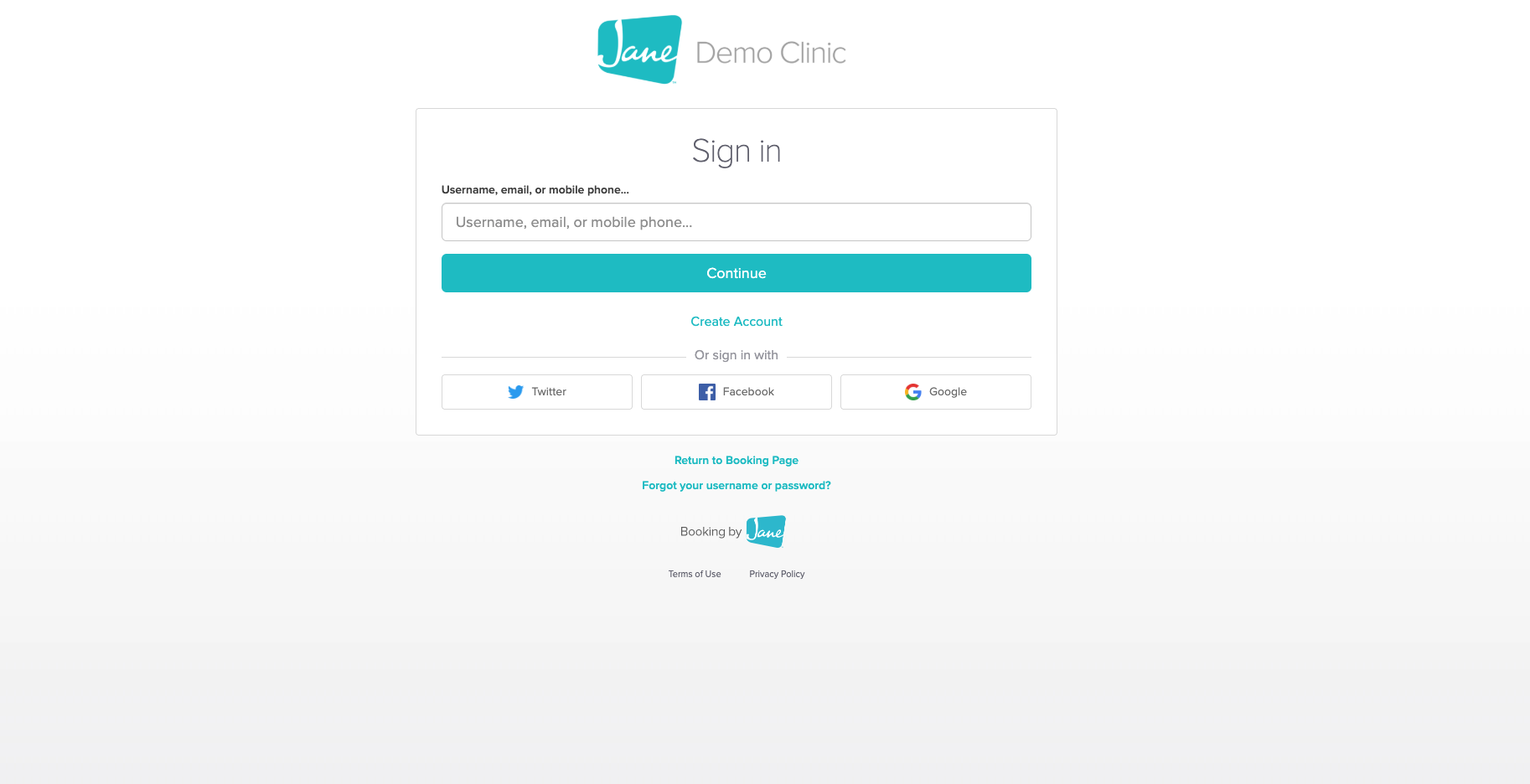
Jane login screen shown to practitioners
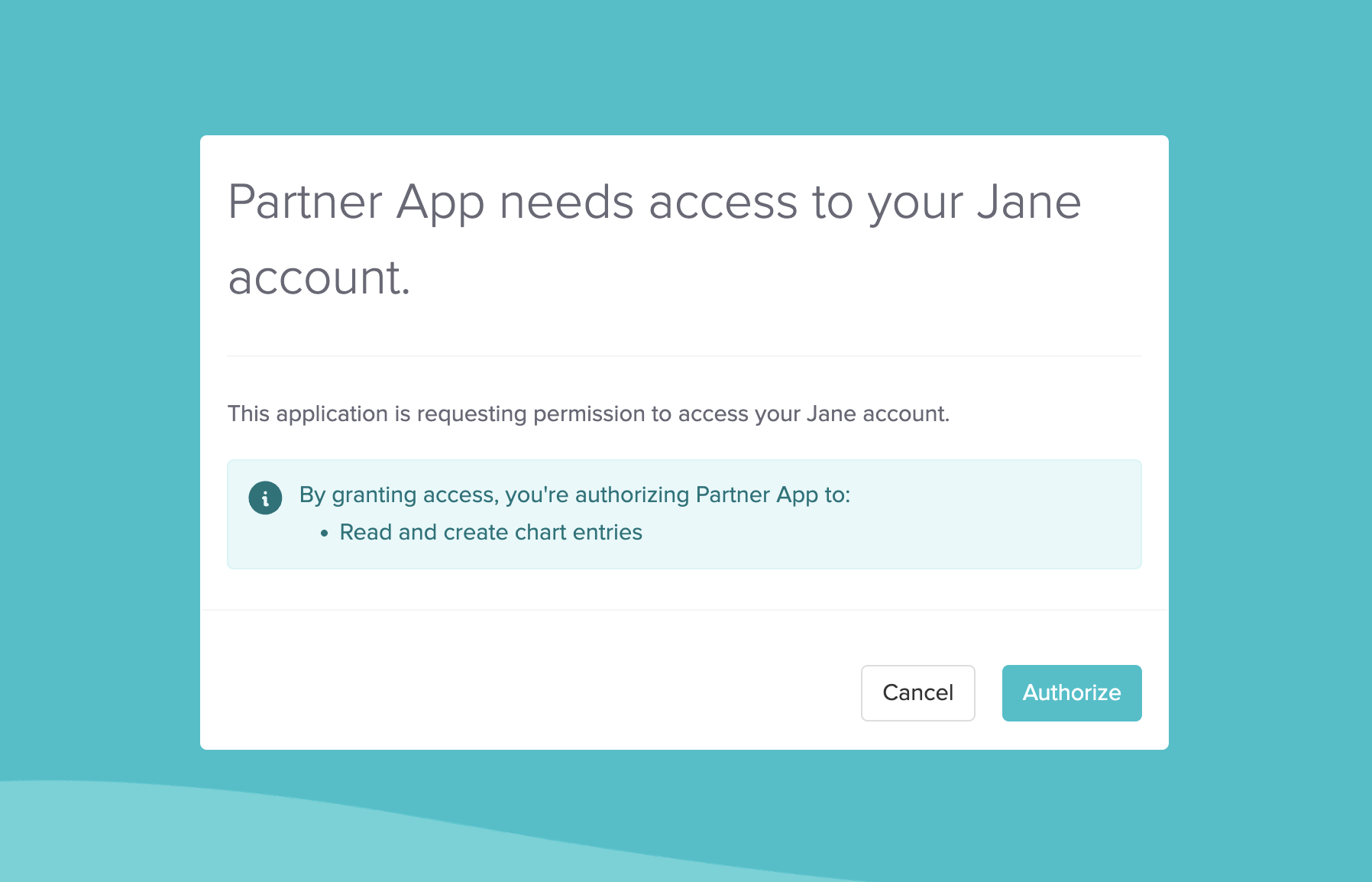
Consent screen where access is approved
Once the practitioner approves access, Jane redirects the browser to your extension's registered callback URL. This redirect includes the authorization code and the original state value as query parameters.
Example Callback URL (with Authorization Code):
https://<redirect_uri>/?code=JJxx883no20r28hfb230h2fb92&state=abc1234566788999989Step 3: Exchange Authorization Code for Access & Refresh Tokens (PKCE Required)
After receiving the authorization code, your extension must exchange it for an access token and refresh token by making a POST request to Jane's token endpoint using the code_verifier associated with the original request.
Send the request to:
POST https://<jane_iam_service_base_url>/realms/<realm_name>/protocol/openid-connect/token
Content-Type: application/x-www-form-urlencoded
Request Body:
grant_type=authorization_code
&client_id=<partner_client_id>
&client_secret=<partner_client_secret>
&code=<authorization_code>
&code_verifier=<code_verifier>
&redirect_uri=<partner_redirect_uri>
Parameter Reference:
| Field | Description |
|---|---|
grant_type | Must be set to authorization_code |
code | The code from the query string. |
client_id | Registered extension ID. |
client_secret | Registered extension secret. |
code_verifier | The code associated with the original request. |
redirect_url | URI associated with the authorization provided during registration. |
Response:
The response includes both an access token and a refresh token:
- Access token: Used to authenticate API requests. It is short-lived (5 minutes).
- Refresh token: Used to obtain new access tokens without re-authenticating. This token must be stored securely.
- You can extract the practitioner's clinic domain by decoding the access token and reading the
aud(audience) claim in the JWT.
Example Response:
{
    "access_token": "eyJhbGciOiJSUzI1...",
    "expires_in": 300,
    "refresh_expires_in": 1800,
    "refresh_token": "eyJhbGciOiJIUzI1...",
    "token_type": "Bearer",
    "id_token": "eyJhbGciOiJSUzI1...",
    "not-before-policy": 0,
    "session_state": "a856fb91-eabc..."
}Scopes must be explicitly authorized by the user during the initial authorization request. If you need additional scopes later, you must redirect the user again and request those scopes as part of a new authorization flow.
Step 4: Call the JDP API Using the Access Token
Once the access token is stored or available to your extension, you can use it to make API requests on behalf of the authenticated practitioner. The access token grants permission to perform actions based on the scopes approved during the authorization flow.
Jane uses a single-tenant architecture, meaning each clinic has its own isolated database. Therefore, API requests must be made to the **same clinic URL **specified as the resource during the initial authorization request (see Step 2). Access tokens are clinic- and practitioner-specific and cannot be reused across clinics.
If your extension needs to access data for a different clinic or practitioner, you must initiate a new authorization flow and obtain a new access token for that context.
Making a Request
When calling the JDP API, include the access token in the Authorization header, using the format:
Authorization: Bearer <access_token>The Content-Type must be set to application/json.
Example API Request:
GET https://<jane_clinic_url>/api/2025-02-28-beta/medical-record/observations/00491e05-c82f-4171-88cd-1d04e9c5fa7c

HEADER
Authorization: Bearer eyJhbGciOiJSUzI1NiIsIn...
Content-Type: application/json
Token Management
Token Lifespan & Refresh Strategy
OAuth 2.0 access to Jane APIs is granted via short-lived access tokens, backed by longer-lived refresh token.
To ensure a seamless integration and avoid unexpected authorization failures, your backend should detect token expiry and refresh tokens proactively.
If your API request returns a
401 Unauthorized, first attempt to refresh the access token using the storedrefresh_token. If that fails, prompt the user to re-authenticate with Jane.
Refresh Token Request Format
POST https://<jane_iam_service_base_url>/realms/<realm_name>/protocol/openid-connect/token
Content-Type: application/x-www-form-urlencoded
Request Body:
grant_type=refresh_token
&refresh_token=<stored_refresh_token>
&client_id=<partner_client_id>
&client_secret=<partner_client_secret>
Revoking a Refresh Token
If your extension needs to revoke access for a user, you must revoke their refresh token.
Since access tokens are short-lived and expire automatically, revoking the refresh token is the most effective way to terminate a user's session. After revocation, the current access token may remain valid until it expires (typically 5 minutes).
Revoke Request Format
POST https://<jane_iam_service_base_url>/realms/<realm_name>/protocol/openid-connect/revoke
Content-Type: application/x-www-form-urlencoded
Request Body:
token=<token_to_revoke>
token_type_hint=refresh_token   # optional but recommended
client_id=<partner_client_id>
client_secret=<partner_client_secret>
Response:
A successful revocation returns:
200Token Introspection
The introspection endpoint lets you verify the active state and associated metadata of an access token or refresh token.
You can use this to:
- Check if a token is still valid.
- Confirm the token's scopes
- Identify which user and client it belongs to
This is useful for debugging, session validation, or authorization diagnostics in your application.
Endpoint
POST https://<jane_iam_service_base_url>/realms/<realm_name>/protocol/openid-connect/token/introspect
Content-Type: application/x-www-form-urlencoded
Request Body:
token=<token_to_inspect>
token_type_hint=refresh_token     # optional but recommended
client_id=<partner_client_id>
client_secret=<partner_client_secret>
Example Request
POST https://<jane_iam_service_base_url>/realms/<realm_name>/protocol/openid-connect/token/introspect
Content-Type: application/x-www-form-urlencoded

token=abc123...
token_type_hint=refresh_token
client_id=your_client_id
client_secret=your_client_secret
Example Response
{
    "active": true,
    "scope": "observations:create observations:read",
    "client_id": "your_client_id",
    "username": "jane.45586783-2",
    "token_type": "Bearer",
    "exp": 1715613497,
    "iat": 1715612297,
    "sub": "0195fda7-9a43-7bbf-ad74-647e521c3cab",
    "aud": ["https://<jane_clinic_url>"],
    "iss": "https://<jane_iam_service_base_url>/realms/<realm_name>",
    "jti": "random-token-id-xyz"
}If the token is inactive,
"active": falsewill be returned and most other fields will be omitted.
Appendix
Best Practices
These best practices will help ensure your extension handles tokens securely, reliably, and in line with Jane's architecture.
-
🔐 Secure Storage Always encrypt and securely store refresh tokens on your backend. Never expose them in frontend code or client-side storage.
-
♻️ Proactive Refresh Automatically refresh access tokens before they expire. Use the expires_in field from the token response to calculate timing.
-
🔁 Resource Matching
Ensure the
aud(audience) claim in the access token matches the clinic URL you're targeting. If there's a mismatch, the request will fail.
Rate Limits
To avoid throttling and ensure reliable performance, your extension should respect the JDP API's rate limits.
All JDP API endpoints have a rate limit of 100 requests per minute per endpoint per clinic.
Rate limit information is returned in response headers:
X-Throttle-Match: Rate limit identifierRetry-After: Number of seconds to wait before retrying (when rate limited)
When rate limits are exceeded, the API returns a 429 status code with a Retry-After header.
Affected Endpoints:
/api/2025-02-28-beta/treatments/api/2025-02-28-beta/appointments/api/2025-02-28-beta/locations/api/2025-02-28-beta/disciplines/api/2025-02-28-beta/patients/api/2025-02-28-beta/staff_members/api/2025-02-28-beta/companyversion: 2025-02-28-beta
🚦 The JDP API limits requests to 600 per 5 minutes per clinic.
Understanding the JWT Access Token
Jane Developer Platform uses JWT Bearer Tokens (signed with RS256) to authorize API access. These tokens are issued by Jane's** Identity & Access Management service** and must be validated before making API requests.
JDP APIs expect the JWT to be passed in the Authorization header, and the token is verified using the RS256 asymmetric algorithm.
We follow the OAuth 2.1 Authorization Framework (IETF) for token structure and handling.
Sample JWT Payload
{
    "exp": 1738714561,
    "iat": 1738713661,
    "jti": "5c3cb8ad-b90f-41f6-9b91-8a8effcbc3ca",
    "iss": "https://<jane_iam_service_base_url>/realms/<realm_name>",
    "aud": ["https://clinic-a.janeapp.com"],
    "sub": "7f7ac94b-18b9-4515-8353-bd2ffe606149",
    "typ": "Bearer",
    "azp": "calling_service",
    "resource_access": {
        "https://clinic-a.janeapp.com": {
            "roles": ["practitioner"]
        }
    },
    "resource_owner": {
        "https://clinic-a.janeapp.com": {
            "staff_members": ["f6ca502e-64b8-47b3-b04f-c381f4080bb1"]
        }
    },
    "scope": "resource:action resource:other_action"
}
Key Fields Explained
| Claim | Description |
|---|---|
exp | Expiration datetime in UTC (UNIX timestamp) |
iat | Issued-at timestamp |
jti | Unique token ID (used for revocation checks) |
iss | Issuer of the token (must match Jane's IAM service) |
aud | Audience: Clinic(s) this token is valid for |
sub | Subject: The user ID in Jane's central auth system |
azp | Authorized party: The client ID of your extension |
resource_access | Roles the user has at that clinic |
resource_owner | Entities (staff/patients) whose resources are being accessed |
scope | Actions this token allows (space-delimited scopes) |
Extension Point URLs with Context
Developers using the Manifest API must specify the external URL that opens when a user clicks their extension in Jane. These URLs can include dynamic context variables which are replaced at runtime with data from the Jane page the user came from.
Context variables are defined using curly braces {variable_name}.
Validate access before trusting context dataContext variables provided by Jane are for convenience only and should not be trusted for authorization. Your application must independently verify that the requesting user has legitimate access to the resources associated with these IDs.
Supported Context Variables
| Variable | Description | Type | Example |
|---|---|---|---|
{patient_id} | Current patient's ID. This variable is populated when a user is redirected to your application from a patient-specific page in Jane (ex. Practitioner viewing a patient profile) | UUID | 63f92dc2-781f-427f-ba9c-8264d1d408d0 |
{clinic_id} | Globally unique clinic identifier | String | 12390 |
{country} | ISO country code of the clinic | String | CA |
Example URL in Manifest
{
  "extension_points": [
    {
      "type": "clinical",
      "category": "HEP",
      "label": "Patient Lab Results",
      "url": "https://your-app.com/labs/{patient_id}?country={country}
    }
  ]
}
When clicked this URL becomes: https://your-app.com/labs/63f92dc2-781f-427f-ba9c-8264d1d408d0?country=CA
Updated 5 months ago